
Bosch 2000/3000 Ethernet module issue with Telstra Smart Modems
🔌 Why the Bosch 3000 Ethernet Module Has Issues with Telstra Modems
The Bosch Solution 3000, using the B426-M Ethernet module, has known compatibility issues with Telstra Smart Modems—especially Gen 2 and Gen 3. The problems usually stem from how Telstra modems manage IP connectivity, especially when switching between NBN and 4G backup.
📡 Main Reasons
-
4G LTE Failover:
Telstra modems automatically switch to 4G backup when they detect a problem with the fixed-line (NBN) connection. This change interrupts the Ethernet connection used by the Bosch module, leading to dropouts or failure to connect with apps like Bosch RSC+. -
IPv6 Handling:
Telstra Gen 3 modems have IPv6 features enabled by default. If IPv6 isn’t properly configured or supported by the Bosch module, it can lead to routing issues, disconnections, or the module being unable to communicate with the Bosch cloud servers. -
APN Configuration:
Even if the SIM isn’t in active use, incorrect or blank APN settings on the modem can cause unexpected behavior in the modem’s networking layer—leading to intermittent communication issues with the Bosch Ethernet module.
✅ Bosch’s Recommendations
-
Enable IPv6 in the modem settings to improve stability.
-
Check and enter correct APN settings—this ensures consistency, even if LTE fallback isn’t used.
-
Disable 4G/LTE failover if possible—this prevents the modem from automatically changing networks and dropping the Bosch connection.
-
Restart the IP module (disconnect from the BUS and reconnect) to refresh the IP assignment.
-
Update the firmware on the B426-M module to the latest version available (e.g., v3.10.030), which improves performance and reliability.
🛠️ Recommended Steps
| Step | Action |
|---|---|
| 1 | Log into your Telstra modem admin panel. |
| 2 | Turn on IPv6 and confirm correct APN settings (even if SIM isn’t active). |
| 3 | Disable LTE backup/failover if the option is available. |
| 4 | Update the B426-M module firmware via A-Link Plus or web interface. |
| 5 | Power cycle the Bosch IP module by removing and reinserting the BUS connector. |
How to reset the IP ethernet module of the Bosch alarm?
You’d do the following procedure if you keep getting the unable to connnect to specified panel error and the issue isn’t the cabling.
To reset the Bosch IP Ethernet Module:
- Use a Philips head screwdriver to open the alarm box.
- When opening the box, the alarm tamper may activate, so use the keypad or key fob to deactivate the alarm.
- The IP module is a smaller electronic panel separate from the main alarm control panel. It is identifiable by its attached internet cable and a flat block connection consisting of four wires (red, yellow, green, and black) that connect to the main alarm control panel.
- To reset and restart the IP module, disconnect the four-wire power supply from the IP module itself. Carefully remove the white BUS connector from one end, then reconnect it to the same spot.
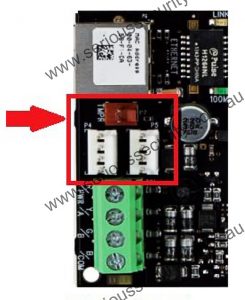
After correctly restarting, the IP module will briefly flash a blue light, followed by a steady orange and green light.
Once you confirm the module has restarted, replace the alarm panel cover. Ensure the cover is securely closed to prevent accidentally setting off the alarm again.
Restart your mobile application and verify that you can access it correctly. If not, contact us for further assistance
How often should I back up my CCTV footage?
The frequency of CCTV backup depends on the nature of the business or premises being monitored. For example, if you own a retail store, it is may be necessary to back up your CCTV footage weekly or monthly to ensure that any incidents that occur in the store are captured on camera. In contrast, if you own a home, backing up the footage everytime an interesting event happens.
It is important to ensure that your storage system has a large enough capacity to allow sufficient time to pass before the data overwrites on the hard drive
It is important to note when the CCTV is beeping – as this can sometimes mean a hard drive failure and it has stopped recording at that point.
What happens if I want a custom alarm package?
This is fine. Customers want to add more features or change things all the time.
You have the option of working out the price yourself via our easy to use extras information. eg. If your package is 1000 and you want to add an extra 4 sensors, you can simply add the cost of the extra 4 sensors to the package cost.
Alternatively, give us a call or fill out the contact form. One of our consultants will try and help you our to the best of their ability.
How loud is my alarm?
Our Bosch alarms are around 100 – 110 decibels. This is louder than a chain saw or a car horn at 5 meters away. 110 dB is as loud as a rock-n-roll band. The siren emits a high frequency oscillating siren intolerable to the human ear. It does a great job at forcing a burglar to have to leave.
Are all the package prices inclusive of GST / Installation?
Yes, indeed. We don’t believe in trying to confuse you with taxes and other mumbo jumbo.
What is a perimeter alarm system?
A perimeter alarm is an alarm which features sensors at all potential entry points in the house. This is great if you’re concerned about someone breaking into a window without crossing into one of the common areas.
If you like the idea of having a perimeter alarm, we can add:
- reed switches on the windows
- glass break detectors on windows
- reed switches on the doors / garage.
How many PIRs do I need?
We find that most average single storey homes needs 3 sensors. These go into the common areas of a house where an intruder would likely visit if they were breaking in.
The sensors would likely go:
- somewhere facing the entry
- a hallway or kitchen
- a back room
If your home is large, you may need 5 or 6 sensors.
What payment options do you have?
Cash, bank deposit and cheque are all OK.
This is expected to be payable on completion of the job or other terms as discussed with our team.
What happens when my Alarm goes off?
With most alarms when an alarm is triggered will make a deafening sound for around 5 minutes. This is a rule set by the state government to reduce noise pollution from false alarms. The alarm will arm again and if broken into again, will sound for another 5 minutes.
If you have added a monitoring option to your Bosch alarm installation, we can program it so it can either ring your phone or push an app notification depending on the chosen option.
You may also choose to call your neighbour or family / friends to check up on your property if any event occurs.
If you choose to add Back to base monitoring, then an alarm monitoring centre will call your mobiles to let you know. They may then send out a security car to check up on the property for a fee.